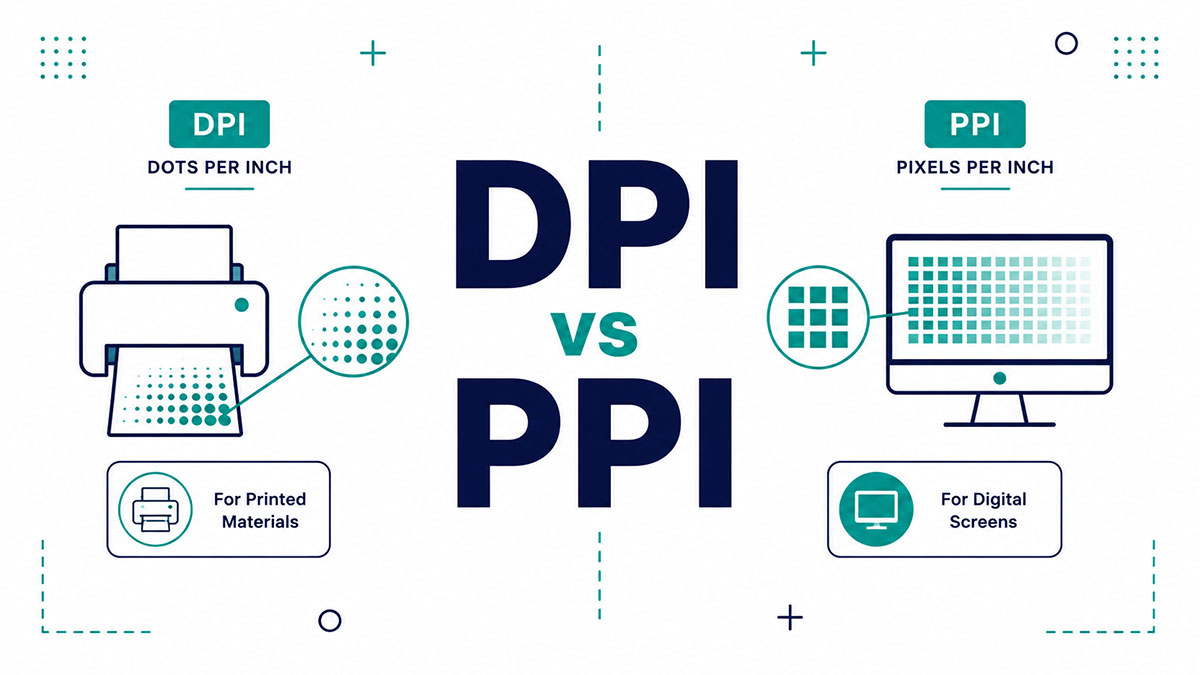
Send a beautiful photo to a printer and get back a blurry mess. The culprit is almost always a mix-up in the DPI vs PPI debate.
Both count density per inch, so people swap them constantly. They measure completely different things.
PPI describes pixels on a screen. DPI describes ink dots on paper. Get the two confused and you waste ink, file size, or a good shot.
This guide breaks down what each term means, why they get tangled, and the exact values your project needs. You will learn to:
- Calculate pixel density for any screen
- Pick the right resolution for print or web
- Stop trusting spec-sheet numbers your eyes cannot see
What Is the Difference Between DPI and PPI?
PPI measures pixel density on digital screens. DPI measures ink dot density on printed paper. Both count density per linear inch, which is why they get swapped so often. One belongs to displays and image files. The other belongs to physical printing.
Same idea, two different worlds. Screens emit light through pixels. Printers push ink through dots.
| Aspect | PPI | DPI |
|---|---|---|
| Measures | Pixels on a screen | Ink dots on paper |
| Applies To | Displays, digital image files | Printers, physical prints |
| Base Unit | Light-emitting pixel | Physical ink deposit |
Get this distinction wrong and you end up sending a blurry file to a printer or bloating a web image for no reason.
What Is PPI (Pixels Per Inch)?
PPI counts how many pixels pack into one linear inch of a digital image or screen. Higher PPI means a sharper, denser display. Modern phones run between 300 and 460 PPI. PPI is a property of monitors and image files, never printers.
Think of a single inch on your screen divided into a grid. Every slot holds one pixel, the smallest colored square in the image. Cram more squares into that inch and the picture tightens up.
Where PPI shows up:
- Smartphone and tablet screens (held close, so they need more pixels)
- Laptop and desktop monitors
- The pixel dimensions stored inside an image file
ScienceInsights data shows a typical smartphone sits between 300 and 460 PPI, while most laptop screens land around 100 to 140 PPI.
The Sony Xperia XZ Premium pushed to 807 PPI on a 4K panel, which is well past what most eyes can resolve. Fun spec sheet number. Barely visible in real use.
If you want the raw mechanics of pixels per inch as a display measure, the short version is this: it only describes how densely pixels are packed, not how many the file actually contains.
What Is DPI (Dots Per Inch)?
DPI counts how many ink dots a printer lays across one linear inch of paper. Printers build color from overlapping CMYK dots, not pixels. 300 DPI is the standard target for sharp photo and magazine work. Below that, detail starts falling apart.
A printer cannot lay down a full pixel. It fakes tone and color with thousands of tiny dots, layering CMYK color until your eye blends them into a smooth image.
- More dots per inch means finer detail and smoother gradients
- Dot size and spacing can vary with dithering, unlike fixed square pixels
- DPI ties directly into halftone screening and LPI (lines per inch) on an offset press
Here is a detail most people miss. A laser printer rated at 600 DPI usually only manages 50 to 65 LPI of real halftone detail, according to DePaul’s desktop publishing notes, because it burns several dots to simulate each tone of gray.
So the advertised DPI on a printer box and the actual detail it prints are two different numbers. Marketing loves the bigger one.
Why Do People Use DPI and PPI Interchangeably?
People swap the two because both use the “per inch” density format, and Photoshop labels image resolution as “DPI” when the value is technically PPI. Scanner software and export dialogs mix the terms. The habit stuck before screens and printers were clearly separated in daily work.
Root cause one: Adobe’s own tools print “DPI” in the resolution field even though a file holds pixels, not dots.
Root cause two: both terms end in “per inch,” so they read as interchangeable to anyone not printing for a living.
Root cause three: the industry itself uses “300 dpi” as shorthand when it means 300 ppi, per PrintNinja’s resolution guide.
Honestly, in casual conversation nobody cares. The moment it matters is prepress, where a print shop expecting pixel density gets confused input and your job comes back wrong.
How Does PPI Affect Display and Screen Sharpness?
Screen sharpness rises as pixel density per inch rises. Phones need higher PPI than TVs because you hold them closer to your face. Apple’s Retina label marks the point where individual pixels stop being visible at normal distance. Same resolution on a bigger screen drops PPI.
A 2025 study in Nature Communications, run by the University of Cambridge and Meta Reality Labs, measured the eye’s real resolution limit at roughly 94 pixels per degree for black-and-white detail, higher than the long-cited 60 ppd figure behind most Retina math.
What drives perceived sharpness:
- Viewing distance (closer needs denser pixels)
- Screen size relative to resolution
- Panel technology, OLED versus LCD subpixel layout
Apple branded the iPhone 4 as the first Retina display at 326 PPI in 2010, the density where pixels blur together at arm’s length. That marketing line set the whole industry’s pixel density benchmark for a decade.
Push resolution higher than the eye can resolve and you gain nothing visible while draining battery faster. Two identical panels can differ in sharpness purely from screen resolution spread across different physical sizes.
How Does DPI Affect Print Quality?
More dots per inch produce smoother gradients and finer detail on paper. 300 DPI suits photos and magazines. Newspapers run lower, near 85 LPI. Billboards print at very low DPI because viewers stand far back. Too few dots create visible banding and jagged edges.
The magic number comes from a ratio. Image resolution should be roughly 2x the halftone screen ruling, so a 150 LPI magazine press wants 300 DPI, a rule documented in ISO 12647-2:2013.
| Print Type | Screen Ruling | Image DPI |
|---|---|---|
| Newspaper | 85 LPI | 170–250 DPI |
| Standard Magazine | 150 LPI | 300 DPI |
| Fine Art Book | 175–200 LPI | 350–500 DPI |
Newspaper photos look coarse for a reason. Uncoated newsprint soaks up ink and spreads the dots, so cramming in more resolution is pointless.
PrintNinja caps accepted files at 400 DPI because anything past the 300 DPI standard adds file weight with zero visible gain on an offset press.
How Do You Calculate PPI?
PPI equals the diagonal pixel count divided by the diagonal screen size in inches. The diagonal pixel count comes from the Pythagorean formula on the width and height in pixels. Two screens with identical resolution show different PPI when their physical sizes differ.
The formula, plain and simple:
PPI = square root of (width in pixels squared + height in pixels squared), divided by the diagonal screen size in inches.
Run a real example. A 1080p phone at 1920 x 1080 pixels on a 5-inch diagonal:
- Diagonal pixels = square root of (1920 squared + 1080 squared) = about 2203
- 2203 divided by 5 inches = roughly 441 PPI
Working in metric first? Convert before you calculate, since an inch equals 25.4 mm. This trips people up when specs list millimeters instead of inches.
The takeaway on how many pixels sit in an inch: it is never fixed. A 1440×900 image on a 19-inch monitor and the same image on a 24-inch monitor produce two completely different densities.
How Does PPI Determine Print Size and Image Resolution?
Print size equals the image’s pixel dimension divided by the target PPI. A 3000 x 2000 pixel image prints sharp at 10 x 6.7 inches at 300 PPI. Drop the PPI and the same file spreads wider but softer. The pixel count never changes.
This is the one calculation that actually matters before you send anything to a lab. Pixels in, PPI chosen, inches out.
| Target PPI | Print Size (3000 × 2000 File) | Best For |
|---|---|---|
| 300 PPI | 10 × 6.7 inches | Framed photos, close viewing |
| 150 PPI | 20 × 13.3 inches | Posters viewed from a distance |
| 72 PPI | 41.7 × 27.8 inches | Large displays where sharp detail is not required |
Enlarging a low-pixel image forces PPI down and the print goes fuzzy. Upscaling adds pixels but not real detail, so a soft file stays soft no matter what the software claims.
Here is the trap most people fall into. A 1080p screenshot at 1920 x 1080 only yields a 6.4 x 3.6 inch print at 300 PPI, per DesignYourWay. Looks huge on a monitor. Barely a postcard on paper.
Cropping to fit a frame changes the usable pixel count too, so a mismatched aspect ratio always limits the print by whichever side runs tightest.
What DPI and PPI Values Should Different Projects Use?
Print photos and brochures at 300 DPI. Large posters and banners run 100 to 150 DPI because viewers stand back. Web images need no DPI tag at all, since screens read pixel dimensions, not the number stored in the file. Match the value to how close the eye gets.
Concrete targets, so you stop guessing at export time:
Photos and brochures: 300 DPI, the floor for anything held at arm’s length (Library of Congress recommends it for 4×6, 5×7, and 8×10).
Posters and banners: 100 to 150 DPI, since distance hides the lower density.
Fine-art giclee: 350 to 400 DPI for prints that get inspected up close.
Web and screen: pixel dimensions only, because the browser throws away the DPI field.
The “72 PPI for web” rule is a leftover from 1980s Macintosh monitors that happened to run at that density. Browsers ignore the embedded number entirely, so an image saved at 72 DPI renders identically to one saved at 300.
Picking the right dots per inch for the job comes down to viewing distance. Most commercial printers, including press maker Heidelberg, align their prepress specs to ISO 12647-2:2013 at 300 DPI trim size.
Quick sanity check on file size: an 8 x 10 print at 300 DPI needs 2400 x 3000 pixels, about 7.2 megapixels, which any modern 12MP phone clears without breaking a sweat (CaesarCipher print math).
Does Higher DPI or PPI Always Mean Better Quality?
No. Quality gains flatten once density passes what the eye resolves at a given viewing distance. Excess PPI just bloats file size with no visible payoff. Printing past a printer’s real output limit wastes ink and storage. Viewing distance sets the useful ceiling for both.
MobileDokan’s read of the vision research shows image quality gains taper off somewhere between 500 and 700 PPI on a phone, past which extra pixels bring little the eye can register while draining battery faster.
Viewing distance changes the whole equation:
- A billboard viewed from 50 feet needs only 10 to 20 PPI to look sharp (BeyondPhotoTips)
- A photo book at arm’s length wants 250 to 300 PPI
- Files sent above 300 DPI to an offset press add weight with zero visible gain (PrintNinja)
Apple’s 27-inch Studio Display runs just 218 PPI yet reads as retina-sharp at 14 inches or farther, according to ScienceInsights. Proof that raw density is not the whole story.
Bigger numbers on a spec sheet sell phones and printers. Your eyes stop counting pixels long before the marketing department does.
FAQ on DPI vs PPI
Is DPI the same as PPI?
No. PPI measures pixels on a digital screen or image file. DPI measures ink dots a printer lays on paper. They share the “per inch” format, which is why people swap them so often.
Which matters for printing, DPI or PPI?
Both, at different stages. PPI sets how densely your file’s pixels map to the paper. DPI is the printer’s hardware output. For submitting files, aim for 300 PPI at final print size.
Does DPI matter for web images?
No. Browsers ignore the DPI tag completely and render by pixel dimensions. A 1200 x 800 image looks identical whether its metadata reads 72 or 300. Only pixel count affects screen display.
What DPI should I use for printing photos?
Use 300 DPI for photos viewed up close, the Library of Congress standard for 4×6, 5×7, and 8×10 prints. Large posters seen from a distance drop to 150 DPI or lower.
How do I convert PPI to DPI?
There is no conversion. They measure different things. In casual use the industry treats “300 dpi” and “300 ppi” as the same number for a print file, but technically pixels become dots at the printer.
What is a good PPI for a phone screen?
Flagship phones run above 400 PPI, with many past 500. Anything over 300 looks sharp at normal viewing distance. Apple branded 326 PPI as Retina on the iPhone 4.
Why does Photoshop say DPI when it means PPI?
Adobe labels the resolution field “DPI” out of habit, even though an image file holds pixels, not dots. The value is technically PPI. This single mislabel drives most of the confusion.
Does higher DPI always mean better quality?
No. Gains flatten once density passes what your eye resolves at a given distance. Past 300 DPI on an offset press, files just get heavier with no visible improvement, only wasted storage.
How many pixels do I need for a 300 DPI print?
Multiply print size by 300. An 8 x 10 inch print needs 2400 x 3000 pixels, roughly 7.2 megapixels. Any modern 12MP phone camera clears that easily for standard photo sizes.
What happens if my image DPI is too low?
The print shows visible softness, banding, or jagged edges. Below 200 DPI at final size, pixelation creeps in. Upscaling adds pixels but not detail, so a low-resolution original stays blurry.
Conclusion
The whole DPI vs PPI confusion collapses once you remember one line. Pixels per inch live on screens. Dots per inch live on paper.
Screens read your image by pixel dimensions and toss the resolution tag. Printers care about ink dot density and the 300 DPI target for anything viewed up close.
Run the math before you export. Print size equals pixel count divided by your target resolution, nothing fancier.
Match the number to the distance:
- Close-up photos and magazines want 300
- Posters and banners survive on 150
- Billboards get away with 10 to 20
Chase spec-sheet density past what your eye can resolve and you gain nothing but bloated files. Get the pixel density right, and every print lands sharp.

Many of his resources are available on various design marketplaces. Over the years, he's worked with a range of clients and contributed to design publications like Designmodo, WebDesignerDepot, and Speckyboy, Slider Revolution among others.
- How to Download Figma Files Fast and Free - October 30, 2026
- Figma Keyboard Shortcuts That Will 10x Your Speed - October 25, 2026
- What is Backend in Web Development? - September 13, 2026

