Design a bright blue logo on your screen, send it to print, and watch it come back looking flat. That gap is where CMYK lives.
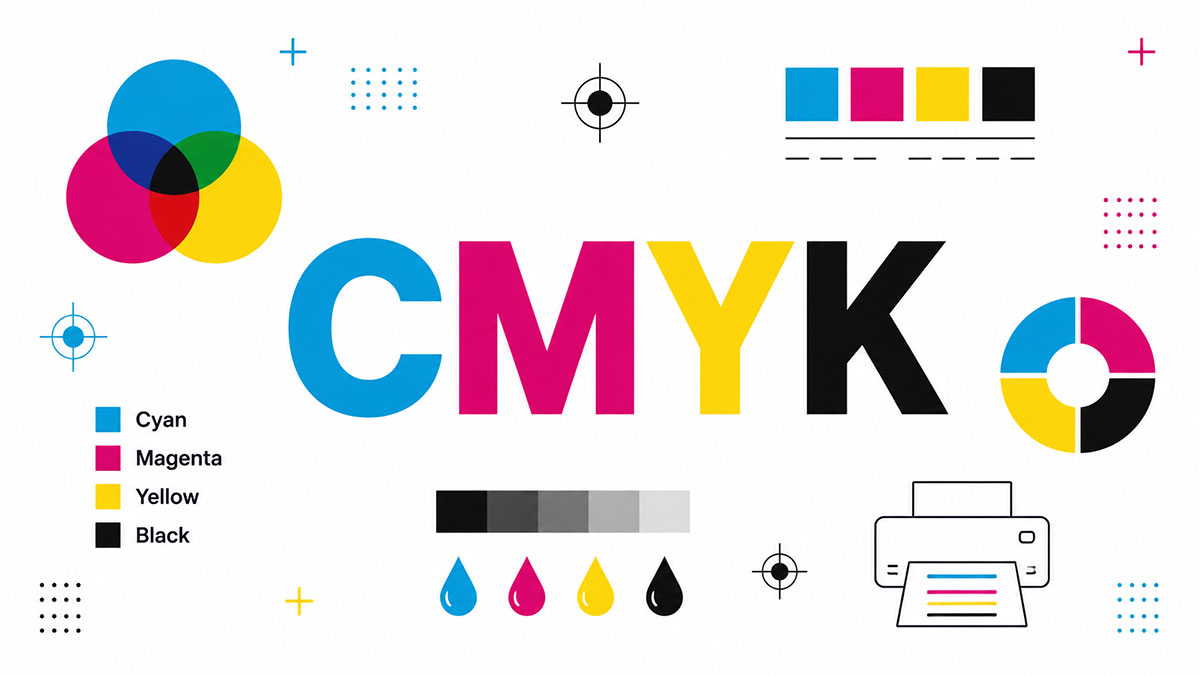
So what is CMYK? It’s the four-ink color model (Cyan, Magenta, Yellow, and Key black) that turns a digital file into ink on paper.
Every magazine, business card, and cereal box on a shelf runs on it. Miss how it works and your printed colors will surprise you, rarely in a good way.
This guide breaks down what each letter means, how the subtractive process builds color, why print never matches your monitor, and when to reach for CMYK over RGB.
By the end, you’ll set up print files that come out the way you designed them.
What Is CMYK?
CMYK is a subtractive color model that builds printed color from four inks: Cyan, Magenta, Yellow, and Key (black). Each ink prints as tiny dots on white paper. The inks absorb specific light wavelengths, and the reflected light left over becomes the color your eye sees.
Values run as four percentages from 0 to 100. Bare paper reads 0,0,0,0. Solid black ink reads 0,0,0,100.
The four color process is older than most people expect. Wikipedia notes CMYK printing was first used in the 1890s for color newspaper illustrations and comic strips.
Alexander’s records another milestone: the Eagle Printing Ink Company put the four-color wet process into practice in 1906, proving the inks could mix into a huge range of darker tones.
What Do the Four Letters in CMYK Stand For?
CMYK stands for Cyan, Magenta, Yellow, and Key. The first three are color inks. Key is the black plate, named because it holds the fine detail and lines up (keys) the other three plates during printing.
| Letter | Ink | Absorbs | Reflects |
|---|---|---|---|
| C | Cyan | Red light | Blue and green light |
| M | Magenta | Green light | Red and blue light |
| Y | Yellow | Blue light | Red and green light |
| K | Key (Black) | Adds depth, shadows, and text | Fine detail and contrast |
Why “K” and not “B” for black? Printworks points out that CMYK actually predates modern RGB, so the old “B means blue” story is shaky. Key is the real root. The term traces back to the key plate, the plate carrying the most detail, which the other colors aligned to.
Cyan, magenta, and yellow layered together should make black. In practice they print a muddy brownish gray, so a dedicated black plate does the job cleaner, cheaper, and with sharper text.
How Does the CMYK Color Model Work?
CMYK works by subtraction. White paper reflects all light to start. Each ink layer removes certain wavelengths, and the leftover reflected light forms the color.
More ink means a darker result. Zero ink leaves bare white paper showing through.
Halftone dots: printers fake smooth tone by varying dot size and spacing. 20% magenta coverage reads as pink, not full magenta.
Dot gain: ink spreads a little as it hits paper, so printed dots grow and colors deepen slightly.
Registration: the four plates must line up exactly. Miss the mark and the image blurs, which is why registration marks sit on every press sheet.
Color Vision Printing reports that layering the four inks in different proportions produces about 16,000 colors. The DPI setting controls how many ink dots land per inch, which drives print sharpness.
Subtractive vs Additive Color
Subtractive (CMYK): ink filters and removes wavelengths from light reflecting off paper.
Additive (RGB): screens add wavelengths of emitted light to build color.
Screens emit light. Paper reflects it. That single physical split is the reason two separate color models exist at all.
CMYK vs RGB: What Is the Difference?
The core difference: CMYK is subtractive and made for print, while RGB is additive and made for screens. RGB color mixes red, green, and blue light. CMYK layers ink. RGB holds a wider range of bright colors that ink cannot physically match.
| Trait | CMYK | RGB |
|---|---|---|
| Type | Subtractive | Additive |
| Made For | Print, ink on paper | Screens, emitted light |
| Gamut | Narrower color range | Wider color range |
| White | Bare paper | All channels at full intensity |
The gamut gap is measurable. ScienceInsights data shows sRGB covers 35.9% of visible color and Adobe RGB reaches 52.1%. Standard CMYK sits smaller than both.
A closer look at how the two models compare shows where each one wins and where files shift on conversion.
Why Colors Look Different in Print Than on Screen
Backlit screens make colors glow. Ink on paper only bounces back room light, so it never matches that punch.
Bright blues, neon greens, and electric shades sit outside CMYK’s printable range. Design software maps them to the nearest ink mix, and the print comes out duller.
Soft proofing in Photoshop or Illustrator previews the printed result before you commit the file.
Where Is CMYK Used?
CMYK is the standard for anything printed on physical material: magazines, brochures, packaging, business cards, flyers, posters, book interiors, and product labels. Both offset presses and digital printers run on it. Your home inkjet uses CMYK cartridges too.
Offset printing: high-volume magazines, catalogs, and packaging on lithography presses.
Digital printing: short runs, fast turnaround, and variable data where every piece can differ.
Home and office: inkjet and laser machines running standard CMYK cartridges.
Packaging is the biggest slice. Mordor Intelligence data shows packaging made up 45.74% of the commercial printing market in 2025.
The format keeps growing. IMARC Group reports the global digital printing market hit $30.5 billion in 2024, climbing at a 5.5% CAGR.
Nearly every carton on a grocery shelf uses CMYK process color, often paired with one spot ink so a brand red or blue stays exact across every run.
How Do CMYK Values Work?
CMYK values are four numbers, each from 0 to 100, showing ink coverage percentage. 0,0,0,0 is white paper. 0,0,0,100 is pure black. 0,100,100,0 mixes magenta and yellow into red.
| CMYK Value | Result |
|---|---|
| 0, 0, 0, 0 | White paper |
| 0, 0, 0, 100 | Flat black |
| 60, 40, 40, 100 | Rich black |
| 0, 100, 100, 0 | Red |
Plain black (0,0,0,100) prints a slightly flat result. A rich black layers color under the black plate for a deeper, denser tone, which is why designers use it on large dark areas.
Add all four percentages and you get Total Area Coverage. Printernational notes coated-stock setups cap total ink near 300% using undercolor removal. One press patent design pulls that limit back to around 280% to stop smearing and slow drying.
RGB counts on a different scale, running 0 to 255 per channel instead of 0 to 100.
What Is the CMYK Color Gamut?
The CMYK gamut is the full set of colors four-ink printing can reproduce. It covers fewer colors than RGB or the human eye. Bright oranges, greens, and blues often fall outside it, which is why some screen colors never print exactly.
ICC profiles: presets like US Web Coated (SWOP) and FOGRA39 define the exact gamut for a given press and paper stock.
Spot colors: Pantone inks hit shades CMYK cannot mix, so brands lean on them for logo accuracy.
The gap is real. Wikipedia notes the core Pantone system held 2,161 colors as of 2019, and roughly 30% cannot be simulated with CMYK at all.
Extended ink sets close some of it. FESPA reports that adding orange and green inks can widen the printable gamut by up to 25% and reproduce up to 90% of Pantone Solid Coated colors.
Pantone’s own library keeps expanding. DesignYourWay cites Artnet’s 2024 reporting that the collection now runs past 15,000 shades, far beyond what four process inks can build on their own.
How Do You Convert RGB to CMYK?
Convert RGB to CMYK by setting the document color mode in Photoshop, Illustrator, or InDesign, choosing the ICC profile that matches your press and paper, checking for out-of-gamut colors, then exporting a print-ready PDF. PDF/X-1a and PDF/X-4 are the two standard export formats printers accept.
The steps run in order:
- Set the document to CMYK mode in your design app.
- Load the right ICC profile (US Web Coated SWOP for coated US stock, FOGRA39 for European coated).
- Turn on soft proofing to preview the print and flag colors that sit outside the gamut.
- Fix the shifted colors by hand, or accept the nearest ink match.
- Export as PDF/X-1a or PDF/X-4.
Rendering intent matters here. Blurb’s print guide recommends Perceptual intent with Black Point Compensation, which holds shadow detail and keeps gradients from banding during the switch.
The old habit of converting every image in Photoshop first is fading. CreativePro notes that current print engines convert RGB cleanly, so a growing number of shops now ask for RGB files and convert at the last stage before press.
Digital presses and large-format inkjet often print brighter when fed RGB content, not CMYK. Ask before you flatten anything.
For a fast check on a single color, a quick RGB to CMYK converter spits out the four ink values without opening any design software.
The one rule every printer repeats: talk to the shop before converting. Profiles differ from press to press, so their preferred setup beats any software default.
When Should You Use CMYK Instead of RGB?
Use CMYK for anything printed on paper or physical stock. Use RGB for web, apps, video, and screen-only graphics. Start print projects in CMYK to dodge last-minute color shifts, and keep a master file in RGB so you can export a fresh CMYK version per print job.
| Deliverable | Use |
|---|---|
| Business cards, packaging, posters | CMYK |
| Website, app, social graphics | RGB |
| Video and motion content | RGB |
| Brand logo master | RGB, export to CMYK per project requirement |
Print work starts in CMYK. Setting up the file in the print model from the first click means the colors you approve on proof are the colors that come off the press.
Screen work stays in RGB. Monitors, phones, and projectors emit light, so RGB holds the brighter range those displays can actually show.
Getting the model right is not a small detail. Straits Research reports that 85% of buyers say color is the main reason they pick one product over another, which is why a brand red that dulls on conversion is a real problem.
Most studios keep one RGB master and branch out from it. If you ever need to pull a print file back toward screen use, a CMYK to RGB converter reverses the values for you.
The safe default: design once, know where it will live, and pick the model before you build. A packaging carton and a landing page for the same product live in two different color worlds.
FAQ on CMYK
What does CMYK stand for?
CMYK stands for Cyan, Magenta, Yellow, and Key. The first three are color inks. Key is the black plate, named because it holds fine detail and aligns the other three plates during printing.
Why is black called K instead of B?
K stands for Key, the plate carrying the most detail on old presses. Since CMYK predates modern RGB, the “B means blue” story is largely a myth, though it still gets repeated often.
Is CMYK additive or subtractive?
CMYK is a subtractive color model. White paper reflects all light, and each ink layer subtracts certain wavelengths. The leftover reflected light forms the color your eye sees.
What is the difference between CMYK and RGB?
CMYK is subtractive and made for print. RGB is additive and made for screens. RGB mixes emitted light and holds a wider range of bright colors that ink cannot physically match.
Why do printed colors look different from my screen?
Screens emit light, so colors glow. Ink only reflects room light. Bright blues and neon greens sit outside the printable gamut, so they get mapped to the nearest ink mix and print duller.
How do CMYK values work?
CMYK uses four numbers, each from 0 to 100, showing ink coverage. 0,0,0,0 is white paper. 0,0,0,100 is black. 0,100,100,0 mixes magenta and yellow into red.
What is rich black in CMYK?
Rich black layers color under the black plate, like 60,40,40,100, for a deeper tone. Plain black (0,0,0,100) prints flatter. Designers use rich black on large dark areas for density.
How do I convert RGB to CMYK?
Set the document to CMYK mode in Photoshop, Illustrator, or InDesign. Load the ICC profile matching your press and paper. Check out-of-gamut colors with soft proofing, then export a print-ready PDF.
When should I use CMYK?
Use CMYK for anything printed on physical material: business cards, packaging, magazines, posters, and labels. Use RGB for screens. Start print projects in CMYK to avoid last-minute color shifts on the press.
What is Total Area Coverage in CMYK?
Total Area Coverage adds all four ink percentages together. Most coated-stock presses cap the total near 300%. Push past that and ink pools, smears, and struggles to dry on the sheet.
Conclusion
Now you know what is CMYK: a subtractive color model that builds printed color from cyan, magenta, yellow, and the key black plate.
The four inks layer as halftone dots on paper, absorbing light so the reflected color reaches your eye.
Its gamut runs narrower than RGB, which is why bright screen colors soften on the press and why ICC profiles and spot inks exist to close the gap.
Keep your total ink coverage in check, load the right profile, and soft proof before you export.
Do that, and the file you approve is the file that comes off the press.
Screens emit. Paper reflects. Pick the model that fits where your design will live.

Many of his resources are available on various design marketplaces. Over the years, he's worked with a range of clients and contributed to design publications like Designmodo, WebDesignerDepot, and Speckyboy, Slider Revolution among others.
- What is Backend in Web Development? - September 13, 2026
- What is Frontend Development? - September 11, 2026
- How to Make a Button in Figma: Design Best Practices - September 10, 2026

